Perform the below steps for managing the deployed soa services using JDeveloper
Select Windows -> Application Servers -> <CustomApplication ServerName>
Click SOA Folder
Expand the SOA partition in which the SOA Composite is deployed
Right-Click the deployed SOA Composite to perform the below given operations
• Stop – Shutdown the running SOA Composite application
• Start – Restart the stopped running SOA Composite application
• Retire – Retire the SOA Composite application. It cannot create new instances.
• Activate – Activates the SOA Composite application
• Undeploy – Undeploy the SOA Composite application from the SOA Server. The SOA composite cannot be configured , cannot create instances and cannot view the previously processed instacnes.
• Set Default Revision – Revision for the SOA Composite application
If the SOA Composite application is to be deployed , then below steps to be performed
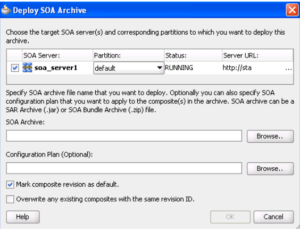
– Right click on SOA Folder, select Deploy SOA Archive
– Select the configure SOA Server
– Select the SOA archive that need to be deployed
– Select the Configuration Plan if created
– Select Default Revision or overwrite for the deployment revision number
Oracle Fusion Middleware includes SOA , OSB , Web Logic Server as the products provided by Oracle. SOA 12c is a software design which enable services to be created , managed and orchestrated into composite applications to support the heterogeneous IT Environment and provide capabilities to implement the business processes. SOA Suite enables the below provided capabilities • Orchestration • Business Rules • Human Task Flow • Messaging • Service Discovery • Web Service Maangement and security (OWSM) • Events Framework • Business Activity Monitoring (BAM)
2) Explain basic SOA concepts and how they map to implementations ?
SOA Suite software uses the Service Oriented Architecture (SOA) allows developers to allows to develop, test and deploy the applications and helps in transforming the complex business requirements to agile and re-usable service based integrations. The applications developed using SOA suite helps in shorten the time to market, provides faster integrations to business requirements and helps in reducing the overall cost.
The below given are the Key concepts / capabilities of SOA Suite:
SOA Suite provides the application development tool which helps in integrating the cloud applications with the On-premise applications in a unified approach which minimizes the overall complexity.
SOA Suite provides the re-usability for service based applications. The developed services can be leveraged for enabling mobile based applications with the support of representational state transfer (REST) services.
SOA Suite enables developers to integrate applications running on different technology (.Net/ Java/PHP), different servers ( Unix/Linux/Solaris) for accomplishing business requirements.
SOA Suite implements J2CA 1.5 specification for JCA Adapters which allows it to communicate with different data source technologies like JMS , Advanced Queue(AQ) , Database Tables, File/FTP, MQSeries. Read the blog – SOA Suite JCA Adapter Architecture
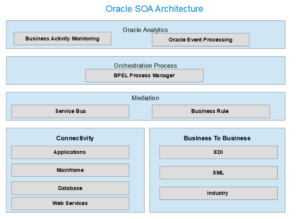
Oracle Service Bus provides the Mediation Process by routing and transformation capabilities.
BPEL Process Manager provides the Orchestration capabilities as part of service integration process.
Oracle Business Rule Engine facilitates in building custom business rules to process the specific business data requirements.
Oracle Event Processing helps in processing the data streaming , capture and invoke events data and providing CQL to query the received data.
Oracle Business Activity Monitoring provides the capability to track the real time operations and performance of the business processes.
Oracle Enterprise Manager Fusion Middleware Control manages and provides the security to all running services using policy driven security framework .
Oracle SOA Suite is deployed as the managed server in the Oracle Weblogic Server (Application Server) which includes Coherence and JRockit ( Oralce JVM) and provides the enhanced performance and faster integration.
Oracle Enterprise Manager Fusion Middleware Control helps in managing and monitoring the deployed SOA Composite applications, fault errors, recovery methods through server console.
3) Describe the Service Oriented Architecture (SOA) principles?
Service Oriented Architecture is an architectural pattern helps in developing service based applications to be integrated in an heterogeneous environment. The below given are the SOA principles:
Standardized service contract
Service loose coupling
Service abstraction
Service reusability
Service autonomy
Service statelessness
Service discoverability
Service composability
4) What are the major drawbacks of SOA?
The below given are the major challenge faced by service-oriented architecture
Web services are only one option to implement the SOA patterns
Stateful services require both the consumer and provider to share the same consumer-specific context which reduces scalability for the service provider if the same service is to be consumed by multiple consumer
Another challenge with SOA implementation is managing of metadata where service based application design requires multiple service calls with authorization access and generates large data volume.
SOA lacks uniform testing framework due to services integrated in the heterogeneous environment leading to complexity
Requires complex testing data for validating the autonomous services
5) What are the key components in SOA Suite 12c ?
The below given are the Oracle SOA Suite key components:
Oracle SOA Suite component
Component Description
Oracle Service Bus
Oracle Service Bus is a configuration-based, policy-driven enterprise service bus for managing the SOA life cycle management.
OSB provides service discovery, service provisioning, highly scalable and reliable service-oriented integration, service management,message brokering with routing and transformation of messages and service monitoring and administration capabilities.
Oracle Business Process Execution Language (BPEL) Process Manager
Oracle BPEL provides standards-based configuration tool to develop service based applications integrated with discrete services into an end-to-end process flow. BPEL services minimizes the complexity of business requirements and reduces the overall cost.BPEL provides dehydration capability , maintains state of long-running business flow instances , provides routing , transformation and custom business rule processing, enables clustering for both fail-over and scalability,enables human workflow services such as task, notification, and worklist management ,provides process-centric composite application development , automating business processes.
Oracle Event Processing
OEP provides the provides a high performance event processing engine to process the large volumes of events data from various data sources in real -time .OEP is built on industry standards like ANSI SQL, Java, Spring Dynamic Modules (DM), and the Open Service Gateway initiative (OSGI).
Oracle Business Activity Monitoring
Oracle BAM helps in monitoring the real time business processes to conclude on tactical and strategical business decisions.
Oracle Java EE Connector Architecture (JCA) adapters
SOA Suite implements J2CA 1.5 specification for JCA Adapters which allows it to communicate with different data source technologies and provides integration with Oracle Applications, Legacy applications, Cloud applications.
Oracle B2B
Oracle B2B supports industry standards like Electronic Data Interchange (EDI), UCCnet, RosettaNet, Chemical Industry Data Exchange (CIDX), Petroleum Industry Data Exchange (PIDX), Voluntary Interindustry Commerce Solutions (VICS), ebXML, and Universal Business Language (UBL) to exchange information electronically with trading partners.
Oralce SOA for Healthcare
provides the web-based user interface to create & configure health care integration applications. It allows to mange and monitor the message processing.
Oracle Enterprise Scheduler
allows to process large volume transactions to be processed at a scheduled time. It can run scheduled joobs deployed as Java, PL/SQL, binary scripts, web services, and Enterprise JavaBeans (EJBs) distributed in an Oracle WebLogic Server cluster
Oracle Managed File Transfer
helps in managing the file gateway and ensure standard based with performance file processing mechanism. It provides lightweight, web-based, design-time console for encryption, scheduling and monitoring of file transfer for embedded FTP and sFTP servers
6) What is a SOA Composite ?
SOA Composite is an collection of services, components and references which are created , managed and deployed as single application integrating the business processes
7) In how many ways the SOA Composite can be configured / created ?
• Empty Composite • Composite with BPEL Process • Composite with Mediator • Composite with Human Task • Composite with Sub Process • Composite with Business Rule • Composite with Spring
8) In how many ways the Interface (WSDL) can be defined for a Web service ?
• Define a new WSDL using the schema • Select existing WSDL • Automatically define service interface WSDL from a component
9) How can we add the description to the SOA Composite Application ?
Click the TO-DO Tasks icon provided above the SOA Composite Editor Add the description Click Close
10) How to invoke the deployed SOA Composite applications ?
Drag the SOAP Adapter in the SOA Composite Editor – External References swimlane
Drag the Partner Link to the Component window – right swimlane
Access the SOA Resource Browser Dialog , Find Existing WSDL from the Create Web Service Dialog.
Select the Application Server Dialog
Select the service from the list of deployed SOA Services
Click OK
11) Explain SOA Suite 12c cloud and mobile integration features ?
SOA Composite is an collection of services, components and references which are created , managed and deployed as single application integrating the business processes. Components are divided as Service Components and Binding Components.
Service components: Service components acts as the building blocks for developing SOA Composite application. • BPEL Process • Business Rule • Human Task • Oracle Mediator • Spring • SubProcess
Binding components : Binding components are used for establishing the connection between a SOA Composite and external services like external web services , JMS Queues , Database Adapters.
Services : Services provides an entry point to connect the SOA Composite with the external services. The protocols ( SOAP /HTTP/REST) used in external services acts as the Binding connectivity within the SOA composite application References – are used to send messages from SOA Composite to the external services/ applications.
Below given are the provided binding components for the external services.
External Services
Binding Component
Web Services ( SOAP Over HTTP)
SOAP enables services over HTTP Protocol
JCA Adapters
helps in integrating services with different technologies with the usage of provided adapters
FTP Servers
FTP Adapter
JMS Messaging
JMS Adapter
Database Server
DB Adapter
Oracle User Messaging Service
Oracle User Messaging Service Adapter
File server
File Adapter
IBM Websphere MQ
MQ Adapter
LDAP Server
LDAP Adapter
Oracle Coherence Cache
Oracle Coherence Adapter
PeopleSoft
PeopleSoft Adapter
Oracle Sales Cloud
Oracle Sales Cloud Adapter
Oracle B2B
helps in browsing B2B Metadata Services Repository (MDS)
Oracle ADF
BC Service – integrates the Oracle Application Development Framework using Service Data Objects (SDO) with the SOA Application
Oracle E-Business Suite
integrates the oracle applications with the use of Oracle E-Business Suite Adapter
BAM 11g Adapter
integrates the Business Activity Monitoring (BAM) for the exchange of data
EJB Service
integrates the Service Data Objects (SDO) parameters or Java Interfaces with the Enterprise Java Beans (EJB)
HTTP Binding
integrates SOA Application with HTTP
REST Service
integration of REST enabled services with SOA Application.
Oracle Managed File Transfer ( MFT)
integrates the transfer files process to and from endpoint types like FTP / SFTP servers, SOA Web Services , Oracle Service Bus , etc.
Cloud Adapters
integration of Cloud application with SOA Application
The blog discuss on the handling of SOA Composite run time fault error and fault recovery mechanism provided by the Oracle SOA Server. Oracle SOA provides the automated SOA Fault recovery with the usage of Fault Policy Wizard.
We will discuss the BPEL Standard faults, classification of BPEL Faults (Business Fault and Run-time Faults) with the help of SOA Composite example using Fault Policy Wizard.
Error handling in Oracle SOA Composite is one of the common pain area. SOA provides the Fault Handling mechanism to capture error message / run time exceptions returned by the invoked web services in BPEL Process Service components. The BPEL provides the below given standard faults
bindingFault
conflictingReceive
conflictingRequest
correlationViolation
forcedTermination
invalidReply
joinFailure
mismatchedAssignmentFailure
remoteFault
repeatedCompensation
selectionFailure
uninitializedVariable
The BPEL fault has a fault name called a Qname (name qualified with a namespace) and a possible messageType. There are two categories of BPEL faults:
Business faults
Runtime faults
Business Faults are the error when the application executes a throw activity or when an invoke activity returns Fault as a response. The invoked service returns error when the required information is not received Example – The Purchase Order Number is not available. A business fault can be caught with a faultHandler using the faultName and a faultVariable.
Run Time Faults are the error received by the BPEL Process Service Component or Web Service at the run time returned by the system, not user-defined. The invoked service is not available, the transformation error occurs at run time, etc. Run Time Faults are provided in the http://schemas.oracle.com/bpel/extension namespace and are associated with the messageType RuntimeFaultMessage
To handle the above mentioned Business Faults and Run Time Faults, we were required to create Fault Policy and Fault binding files manually in SOA 11g. But now with SOA 12c, the Fault Policy Wizard has been provided to create the Fault Policy with ease for the composites. Let’s create a sample application which invokes the Remote Service. The Service will handle the RemoteFault using the SOA 12c Fault Policy Wizard and link it to the Fault Binding File
Create the SOA Application and Project – FaultPolicyRemoteInvocPrj
Select the options with No Composite
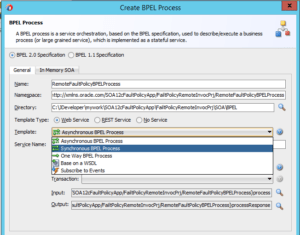
Create the synchronous BPEL Process – RemoteFaultPolicyBPELProcess
Fault Policy Wizard- Application
Create the Partner Link with the enabled WSDL. Create the Invoke Activity and provide the details for the created partner link. Create the Invoke Input Variable – InvokeCustomSupplierSrvc_updateSupplier_InputVariable Now, let’s utilize the Fault Policy Wizard. Right click on the SOA project and click on New ->From Gallery. Choose SOA Tier -> Faults -> Fault Policy Document to create new fault policy file. Below given are the actions which can be used for the custom fault policy. Multiple Fault Policies can be created.
Fault Policy Wizard
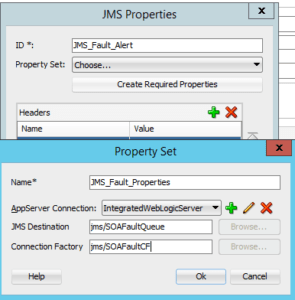
The Alerts can be created with any of the 3 given types (JMS, Log and email). Let’s use JMS Alert to see the required details to be entered. Provide the Alert Id and then click on ‘Create Required Properties’. Enter the Property Name and then select the Web Logic Server and the JMS Queue and JMS Connection factory created in the Web Logic JMS Module.
Fault Policy Wizard -JMS Properties
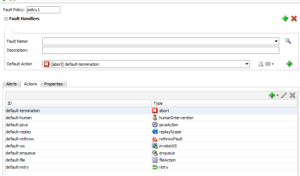
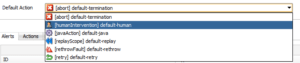
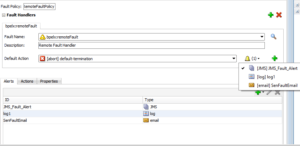
Click OK and these details will be shown in the Alert Window. Now link the created JMS Alert to the Fault which need to be captured. Enter the Fault Name: bpelx: remoteFault Enter the description: Enter the Default Action: [abort] default-termination Below given are the available action to be selected.
Fault Policy Wizard -Actions
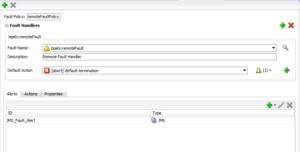
The below screenshot provides the complete details entered for handling the Remote Fault.
Fault Policy Wizard -Actions Details
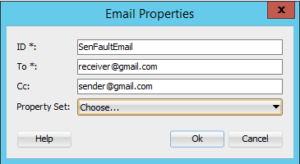
Similarly, you can select the Alert for Email and Log also.
Fault Policy Wizard -Email Details
You can map the Created Remote Fault accordingly with any of the created Alert. You can select 1 Alert for the 1 Fault Policy. Set the Alert Property Set similar to JMS Property Set.
Fault Policy Wizard -Complete Wizard Details
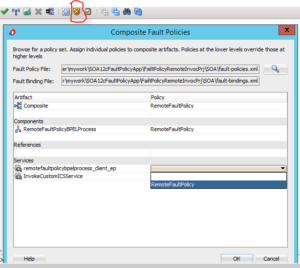
Now, we need to create the fault binding file and link the created RemoteFaultPolicy to the available composite, components, services and references. Now click on the highlighted icon to Edit the Fault Policies and map the value of RemoteFaultPolicy to composite, components, services and references
Composite-Fault-Policy Binding
As the scenario is shown for the RemoteFault, the remote service which will be invoked thorough this application should be down to get the fault policy invoked.
Deploy the application and test the SOA Composite application
Oracle SOA 12c provides new feature “Translate Activity” which can be used to convert any native format file like CSV to XML and vice versa. The blog provides the steps to translate the Native Format File to XML File.
Translate Native Format File to XML File
Consider a common scenario where XML message can contain delimited / fixed length string and to overcome such issues SOA 11g provided the File / FTP Adapter as the mechanism but there was no specific activity available to confirm the XML messages to Native Format or from Native Format to XML message from the received input.
SOA 12 c provides Translate Activity as the solution for such transactional data. Steps are similar to what we use in the File /FTP Adapter Let’s go through the sample given below to see how to convert XML messages to Native Format or from Native Format to XML message using the Translate Activity
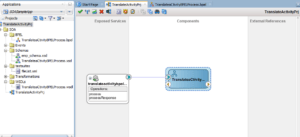
Create the SOA Application for the Translate Activity
SOA-Translate-Activity
Drag the Translate Activity from Oracle Extensions to the BPEL Process
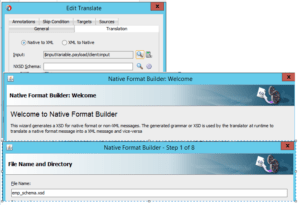
Double Click the Translate Activity to get the translation tab. Translate Activity provides below options ( Native to XML and XML to Native)
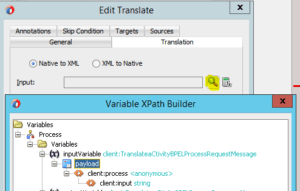
Select the option as Native to XML and click on the Search Icon corresponding to the Input parameter. The below given is the Input Variable Payload Input String
SOA-Translate-Activity Input String
Convert the Schema to Native (delimited string) to XML format. We can use either of the given below options
Option 1 – Provide the available schema OR
Option 2- Generate the schema using the Native format builder wizard
Click Option 2 for the NXSD schema to generate the Native schema
SOA-Translate-Activity-Native-Builder-Format
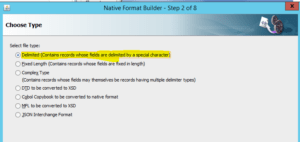
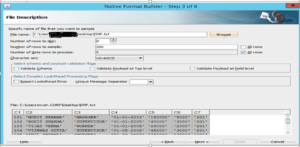
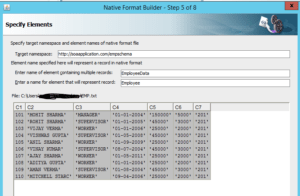
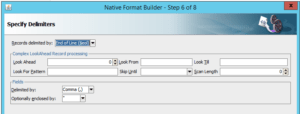
Select the option as Delimited. Specify the file with the Native format which includes delimited records. I have selected EMP.txt file with sample employee records delimited with commas
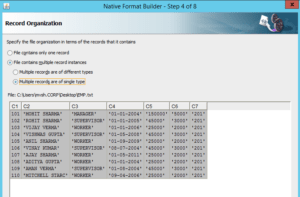
The next steps identifies the number of records present in the file ( whether there is single record or it could be multiple record file), whether it contains single type data or different type data.
Define the target namespace for the schema
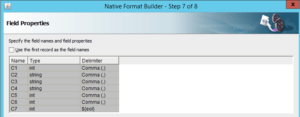
The Native Format builder wizard shows the Type for each column identified with the delimiter ( Commas )
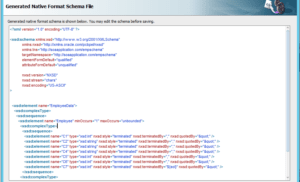
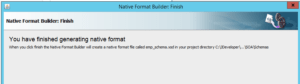
Below given is the screenshot for the Native Schema File generated
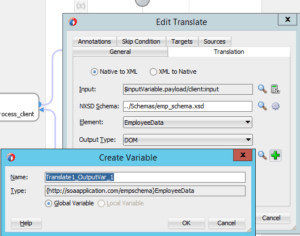
The Translate activity includes Input and Output Variable. The Input variable was intialized, now the schema has been generated. Create the Output Variable by clicking the GREEN + icon
Oracle SOA provides the File Adapter for processing the file based SOA Composite applications by supporting the file adapter polling configuration. When File adapter polling configuration is enabled, the SOA composite application starts polling the file immediately once it is deployed and keep polling the file directory as per the given polling frequency.
The SOA File adapter provides the option as “Trigger File” checkbox, which enables the file polling when the trigger file is placed in the trigger directory. This provides the restriction on how to poll the files based on trigger.
Oracle SOA File Polling Options with File Adapter
Oracle SOA Provides the below given File Polling options
Polling Frequency : This option defines after how much time the file polling is to be done.
Minimum File Age: This option is useful when we have large files for processing and we know that it will take time for file to be processed and thus next available new file should be read after that. So increasing the value here ensures that no file is missed from getting processed.
Check box for Trigger File : This option when checked then the above 2 Options Polling Frequency and Minimum File Age will not be used as file will not be Polled automatically, they requires a trigger or in simple words it need to be invoked
Oracle SOA File Polling using Triger File option
Select the File Adapter to the SOA Composite Application
Enter the Service Name for the File Adapter
Select the Adapter Interface as ” Define from operation and Schema”
Select the operation as “Read File”
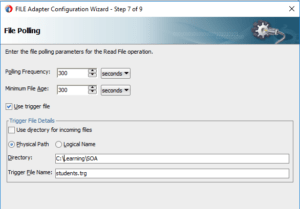
Enter the File Polling Frequency value
Enter the Minimum File age value
Select the checkbox” Use Trigger File” as an option
We need to provide the file location from where the file will be processed .
We need to provide the Trigger File Name for which file adapter should check having extension as .trg. If this file is available , then file adapter will poll the students.txt file and get it processed.
Such file trigger mechanism is useful when data is critical for processing and needs confirmation before it is processed . With the file data , we need to place the trigger file which , when read by the file adapter gives the confirmation / triggering to proceed with the file processing.
The below given are the steps for configuring File Adapter in SOA BPEL Project. The File Adapter provides the below given operation to read and write files on the application server.
READ : The READ Operation of File Adapter picks and read the file data from the given server location
WRITE : The READ Operation of File Adapter allows to write files to a specific server location
SYNCHRONUS READ : The SYNCHRONUS READ Operation of File Adapter allows to to read a file in middle of the process
LIST FILE : The LIST FILE Operation of File Adapter allows to list all the files in a given directory
CHUNKED READ : The CHUNKED READ operation is used for processing large file data . The chunk Size provides the option of reading data content in sizes to minimize the performance impact on the server and other running services on the application server.
Please find below the steps to create the File Adapter in SOA Project
Create a new SOA Project and provide the Project Name
Select the “Empty Composite” template and click on Finish
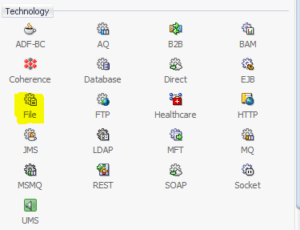
Drag and drop the File Adapter from the Palette , Components -> Technology
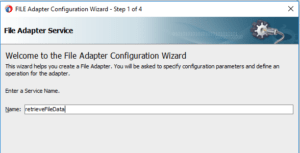
4. The File Adapter Configuration Wizard will open. Provide the File Adapter Service Name and click Next
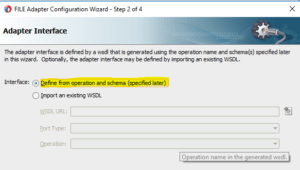
5. As we will be reading the data content from the file and does not require any transformations, the default option
will be selected for the File Adapter Interface. Click Next.
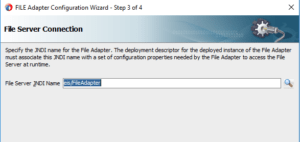
6. Provide the File Server JNDI Name
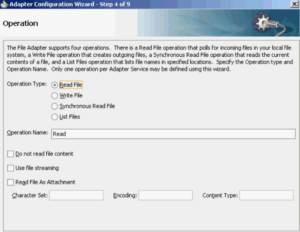
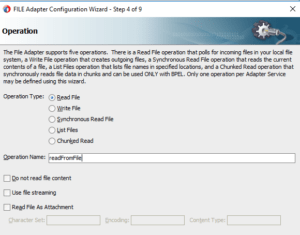
7. Select the File Adapter ReadFile Operation for reading the file data content.
Provide the Operation Name and Click Next
8. Provide the File Adapter Directory Path from where the file is to be picked and read
Select the option to process the files recursively
Select the option to archive the file once they are read for reference. Provide the Directory path where file to be placed once processed.
Select the option to Delete the file once they are successfully processed.
Click Next
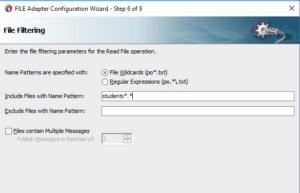
9. Provide the extension which are allowed for reading the files .
students *.txt allows to read the text file
students *.* will allow to read all file starting with name students
Click Next
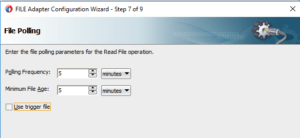
10. Define the Polling frequency for the file adapter to check and read file from a particular server location.
Polling Frequency : This option defines after how much time the file polling is to be done.
Minimum File Age: This option is useful when we have large files for processing and we know that it will take time for file to be processed and thus next available new file should be read after that. So increasing the value here ensures that no file is missed from getting processed.
Click Next
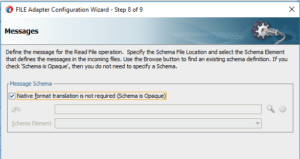
11. Select the default option for the Opaque Schema as file is read and processed as it and not required any transformation.
Click Next
12. Click Finish to complete the File Adapter Configuration Wizard.
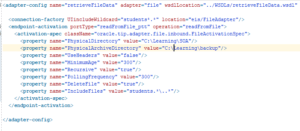
My previous post ( DB Adapter configuration in SOA 12c) had shown the steps to configure the DB Adapter but it is observed that the DB Adapter Polling does not work correctly when records are retrieved in a clustered environment.
Example :
The Customer Order details to be picked from the Oracle Database , transformation of the data as per business scenario and then send the updated data to the target server for further processing. In a clustered environment, the DB Adapter polling will be done simultaneously by all the configured managed server at the same whereas single instance should be initiated to retrieve the order details.
Solution:
NON XA Datasource : Do not use the XA datasource when using distributed transactions as it can cause problems with autonomous transactions such as java.sql.SQLException
Distributed Polling : While configuring the DB Adapter , select the option for the Distributed Polling
DB Adpater Plan.xml : Ensure that once the configuration of DB Adapter in the Weblogic Server is being done, update the Plan.xml file (deployment plan for the DbAdapter) to the other managed server
Singleton Property in Composite: To enable for high availability environment for a inbound database adapter , add the singleton JCA service binding property in the composite.xml with value as ‘true’
There could be scenarios where BPEL Service need to integrated with Database for the persistence or data retrieval while developing custom SOA Services. The below given are the steps to configure the DB Adapter in the SOA Project.
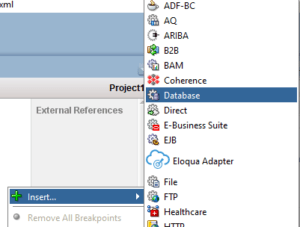
Select the DB Adapter from the Components -> Technology
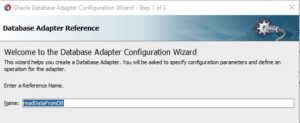
Provide the name to the DB Adapter which need to be configured
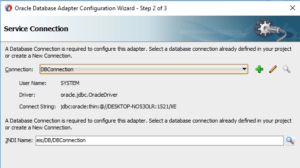
Create or select the created database connection details
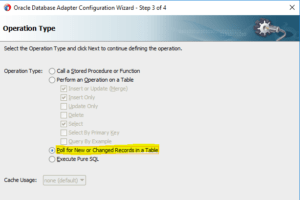
Select the Database Operation Type
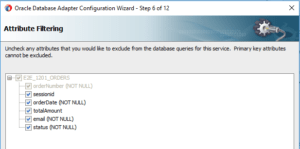
Select the database table by clicking on Import Tables button and select the columns that are required
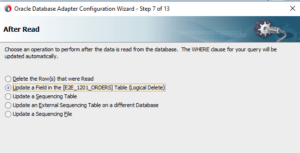
Select the option which need to be performed once the new records are picked for processing
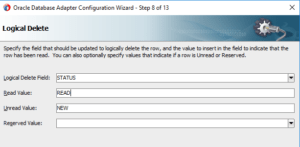
Update the values for the Logical Delete , Read records and Unread records
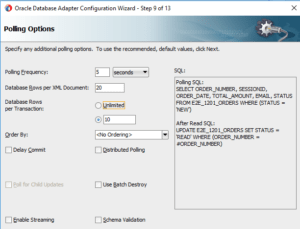
Update the Database Polling options as per the application need. Select the Distributed Polling in case of Clustered environment.
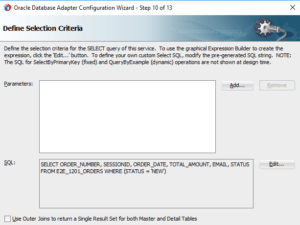
Add the parameter binding in case of run time value to be passed to the Database SQL or Edit the provided SQL in case of any additional check to be updated.
Update the Java Connector End Point Properties as per application need
Click Finish to complete the Database Adapter Configuration Wizard.
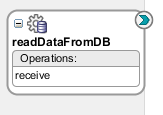
The DB Adapter will be configured in the SOA Project with the selected options in the Configuration Wizard.
Web Service is an standard way of integrating the web based applications using XML, SOAP, WSDL , UDDI standard to interact among different applications running on different technologies due to its interoperability feature supported being XML based , for the exchange of data.
There are mainly two types of web services.
SOAP web services
Restful web services
What is a WSDL ?
WSDL stands for Web Services Description Language , is an XML-based language used to describe the Web Services ( location of the service, and the methods of the service). It uses the below given elements
<types> – provides the (XML Schema) data types used by the web service
<message> – provides the data elements for each operation
<portType> – provides the operations that can be performed and the messages involved.
<binding> – provides the protocol and data format for each port type
What is SOAP ?
SOAP stands for Simple Object Access Protocol , is an XML based protocol for accessing Web Service.
What is a XML Schema ?
XML Schema defines the structure of an XML document also known as XML Schema Definition (XSD). It provides the list of elements and attributes with the data types to be used ( integer , string , etc).
What is Oracle Fusion Middleware ?
Oracle Fusion Middleware is the collection of different software products provided together for building UI based applications with middleware integrations and usage of different technologies combined together to achieve complex business solution with ease. Oracle Fusion Middleware offers complete support for development, deployment, and management. Oracle Fusion Middleware includes the below products
Service-Oriented Architecture (SOA)
Oracle Service Bus ( OSB)
Application Development Framework (ADF)
Application Architecture Integration (AIA)
Business Intelligence
Oracle Identity Management
Oracle Data Integration
Oracle WebLogic Server for deployment and management of applications, adapter, web services , authentication
What is SOA ?
SOA stands for Service Oriented Architecture . Oracle SOA is one of the software products (Oracle SOA Suite) of the Oracle Fusion Middleware developed by Oracle which acts as a middleware layer for the integration between different applications. It provides a complete set of service infrastructure components for designing, deploying, and managing composite applications. It enables services to be created, managed, and orchestrated into composite applications and business processes.
It includes the following components:
BPEL Process Manager (bpel, Mediator, Rules, B2B, and Human Workflow)
Oracle Business Activity Monitoring (BAM)
Oracle Business Process Management (BPM) Suite
Advantages of using Oracle SOA
Loose coupling
Reusability
Interoperability
Flexible
What are the components provided by the Oracle SOA Suite ?
BPEL Process Manager
Mediator
Human Workflow
Business Rules
Adapters – ( File Adapter , JMS (Queue and Topic) Adapters, , AQ Adapters, DB Adapter, Coherence Adapter)
AngularJS expressions are JavaScript-like code snippets used to bind application data to html. The syntax for the Expressions uses double braces like {{ expression}} or {{ 1+1 }} . The below given are the valid expressions in the angularJS script execution
5+5
x+y
user.name
products[index]
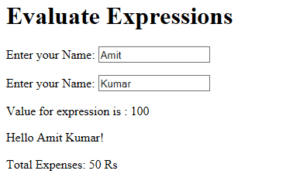
The below sample shows the usage of different ways of executing expressions in angularJS
Sample code:
<html>
<head>
<script src = “https://ajax.googleapis.com/ajax/libs/angularjs/1.5.2/angular.min.js”></script>
</head>
<body>
<h1>Evaluate Expressions</h1>
<div ng-app = “”ng-init = “quantity = 5;cost = 10;”>
<p>Enter First Name: <input type = “text” ng-model = “firstName”></p>
<p>Enter Last Name: <input type = “text” ng-model = “lastName”></p>