Skip to content

oracleappshelp.com

Node.JS Blogs

  • MongoDB
  • Oracle R12
  • SOA Suite 12c
  • ADF 12c
  • Interview Questions
  • Node.js
  • ReactJS

Categories

  • ADF Issues
  • Angular JS
  • AP- Account Payables
  • Architecture
  • cloud computing
  • Databases
  • Devops
  • FA – Fixed Assets
  • Interview Questions
  • Java
  • Java Basics
  • Java Springs
  • JavaScript
  • JDeveloper
  • MongoDB tutorial
  • Node.js tutorial
  • OM- Order Managment
  • Oracle ADF
  • Oracle Apps
  • Oracle General Ledger
  • Oracle Receivables
  • Oracle SOA
  • ReactJS Tutorial
  • SQL Server
  • System Administrator
  • WebLogic
  • XML Tutorial

Popular Tutorials

  • MongoDB
  • Oracle R12
  • SOA Suite 12c
  • ADF 12c
  • Interview Questions
  • Node.js
  • ReactJS

Pages

  • MongoDB Tutorial for beginners
  • Oracle ADF 12c Tutorials for beginners
  • Oracle EBS R12 Tutorials
  • Oracle SOA Suite 12c Tutorials for beginners
  • React JS Programming Tutorial for beginners
  • RSS Feed
  • Style Components in React JS

Category: AP- Account Payables

Oracle EBS R12 Account Payables Tutorial, Account Payables Invoice Status,  Account Payables Receipt validation process, Account Payables Accounting setup, Account Payables Reconciliation , Account Payables Period Closure

oracle apps query to get PO approval workflow activity

28 Jan 2021 oracleappsadmin

The blog provides the Oracle Apps R12 SQL Query to get fetch PO approval workflow activity details

SELECT	EXECUTION_TIME,
		WF_Item_Actvity_Status.BEGIN_DATE,
		WF_Actvity_tbl2.NAME PROCESS,
		WF_Actvity_tbl2.DISPLAY_NAME ,
		WF_Actvity_tbl1.NAME ACTIVITY,
		WF_Actvity_tbl1.DISPLAY_NAME ,
		WF_Item_Actvity_Status.ACTIVITY_STATUS,
		WF_Item_Actvity_Status.ACTIVITY_RESULT_CODE,
		WF_Item_Actvity_Status.ASSIGNED_USER,
		WF_Item_Actvity_Status.NOTIFICATION_ID ,
		WF_NOTIF_TBL.STATUS,
		WF_Item_Actvity_Status.ERROR_NAME,
		WF_Item_Actvity_Status.ERROR_MESSAGE ,
		WF_Item_Actvity_Status.ERROR_STACK          
FROM 	APPLSYS.WF_ITEM_ACTIVITY_STATUSES WF_Item_Actvity_Status,
		APPLSYS.WF_PROCESS_ACTIVITIES WF_Proc_Actvity,
		APPS.WF_ACTIVITIES_VL WF_Actvity_tbl1,
		APPS.WF_ACTIVITIES_VL WF_Actvity_tbl2,
		APPLSYS.WF_ITEMS WF_ITEM_TBL,
		APPLSYS.WF_NOTIFICATIONS WF_NOTIF_TBL
WHERE 1=1
AND 	WF_Item_Actvity_Status.ITEM_TYPE       		 = 'POAPPRV'
AND 	WF_Item_Actvity_Status.ITEM_KEY   			 = '<ENTER_ITEM_KEY>'
AND 	WF_Item_Actvity_Status.PROCESS_ACTIVITY  	 = WF_Proc_Actvity.INSTANCE_ID
AND 	WF_Proc_Actvity.ACTIVITY_NAME         		 = WF_Actvity_tbl1.NAME
AND 	WF_Proc_Actvity.ACTIVITY_ITEM_TYPE 	 		 = WF_Actvity_tbl1.ITEM_TYPE
AND 	WF_Proc_Actvity.PROCESS_NAME      			 = WF_Actvity_tbl2.NAME
AND		WF_Proc_Actvity.PROCESS_ITEM_TYPE 			 = WF_Actvity_tbl2.ITEM_TYPE
AND 	WF_Proc_Actvity.PROCESS_VERSION   			 = WF_Actvity_tbl2.VERSION
AND 	WF_ITEM_TBL.ITEM_TYPE           			 = 'POAPPRV'
AND 	WF_ITEM_TBL.ITEM_KEY            			 = WF_Item_Actvity_Status.ITEM_KEY
AND 	WF_ITEM_TBL.BEGIN_DATE         				 >= WF_Actvity_tbl1.BEGIN_DATE
AND 	WF_ITEM_TBL.BEGIN_DATE          			 < NVL(WF_Actvity_tbl1.END_DATE, I.BEGIN_DATE+1)
AND		WF_NOTIF_TBL.NOTIFICATION_ID(+)				= WF_Item_Actvity_Status.NOTIFICATION_ID
ORDER BY 2,1;

Query to get Requisition Approval Path 

SELECT 	PER_POS_STRUC_TBL.NAME
FROM 	PO_REQUISITION_HEADERS_ALL 				PO_REQ_HDR_TBL,
		WF_ITEM_ATTRIBUTE_VALUES 				WF_ITM_ATTR_VAL_TBL, 
		PER_POSITION_STRUCTURES 				PER_POS_STRUC_TBL
WHERE 	1=1
AND 	WF_ITM_ATTR_VAL_TBL.ITEM_TYPE = PO_REQ_HDR_TBL.WF_ITEM_TYPE
AND 	WF_ITM_ATTR_VAL_TBL.ITEM_KEY = PO_REQ_HDR_TBL.WF_ITEM_KEY
AND 	WF_ITM_ATTR_VAL_TBL.NAME = 'APPROVAL_PATH_ID'
AND 	TO_NUMBER(WF_ITM_ATTR_VAL_TBL.NUMBER_VALUE) = PER_POS_STRUC_TBL.POSITION_STRUCTURE_ID
AND 	PO_REQ_HDR_TBL.SEGMENT1 = '<ENMTER_REQUISITION_NUMBER>' ;
AND 	PO_REQ_HDR_TBL.ORG_ID = <ENTER_ORG_ID>;

Query to get Requisition Approval Path 

SELECT 	PER_POS_STRUC_TBL.NAME
FROM 	po_headers_all poh 						PO_HDR_TBL,
		WF_ITEM_ATTRIBUTE_VALUES 				WF_ITM_ATTR_VAL_TBL, 
		PER_POSITION_STRUCTURES 				PER_POS_STRUC_TBL
WHERE 	1=1
AND 	WF_ITM_ATTR_VAL_TBL.ITEM_TYPE = PO_HDR_TBL.WF_ITEM_TYPE
AND 	WF_ITM_ATTR_VAL_TBL.ITEM_KEY = PO_HDR_TBL.WF_ITEM_KEY
AND 	WF_ITM_ATTR_VAL_TBL.NAME = 'APPROVAL_PATH_ID'
AND 	TO_NUMBER(WF_ITM_ATTR_VAL_TBL.NUMBER_VALUE) = PER_POS_STRUC_TBL.POSITION_STRUCTURE_ID
AND 	PO_HDR_TBL.PO_HEADER_ID = <PO_HEADER_ID>;
AND 	PO_HDR_TBL.ORG_ID = <ENTER_ORG_ID>; 
AP- Account Payables

Query to fetch CREATEPO Workflow for the approved requisition

28 Jan 2021 oracleappsadmin

The blog provides the Oracle SQL Query to fetch CREATEPO Workflow for the approved requisition. The Query requires the Requisition Number and particular ORG_ID for which approved requisition is to be determined.

Retrieve the Requisition Header Id

SELECT REQUISITION_HEADER_ID
FROM PO_REQUISITION_HEADERS_ALL
WHERE SEGMENT1 = '&REQ_NUMBER'
AND ORG_ID = &ORG_ID;

Retrieve Item Type and Item Key by passing Requisition Header Id

SELECT ITEM_TYPE, ITEM_KEY
FROM WF_ITEMS
WHERE ITEM_KEY LIKE '&REQ_HDR_ID'||'%'
AND ITEM_TYPE='CREATEPO'
AND ROOT_ACTIVITY = 'OVERALL_AUTOCREATE_PROCESS';

Retrieve the Root Activity , item Type and Item Key by passing the Requisition Header Id

SELECT ITEM_TYPE, ITEM_KEY, ROOT_ACTIVITY
FROM WF_ITEMS
WHERE PARENT_ITEM_KEY LIKE '&REQ_HDR_ID'||'%'
AND ITEM_TYPE='CREATEPO'
AND ROOT_ACTIVITY IN ('REQ_LINE_PROCESSING', 'CREATE_AND_APPROVE_DOC');

AP- Account Payables

AP Supplier Conversion in Oracle Payables R12

24 Jan 2021 oracleappsadmin

The blog covers the Supplier Conversion Process in Oracle Payables R2.  The Supplier Conversion Process in Oracle Payables is one of the most commonly used for Supplier Conversion / Migration Process. The Supplier Conversion / Migration Program loads the Supplier Master Data, Supplier Sites Data and Supplier Contacts from source data files into Supplier Staging Tables in Oracle Payables, Validates the  Supplier Staging Data and loads into Supplier Interface Tables.

Open Interface Approach :
Flat File
-> processed using SQL *Loader
Staging Table
    -> processed using PLSQL Package
Interface Table
    -> processed using Standard Concurrent Programs
    

Prerequisites for Supplier Conversion Process

The below given setup should be available before Supplier Conversion Program runs

  • Set of Books Setup
  • Payment Terms Setup
  • Pay Groups Setup
  • GL Code Combinations (CCID) Setup
  • Supplier Setup
  • Bank Accounts Setup
  • Currency Setup
  • Employee Setup ( if Employee is considered as Supplier)

Supplier Data Load for Supplier Conversion Process

The below given approach can be used for load Supplier Data Load for the Supplier Conversion Program

  • SQL Loader: SQL Loader helps in loading the bulk records into Oracle Tables
  • APEX: Oracle Application Express could be another option for bulk upload for supplier records

Supplier Validation in Supplier Conversion Process

The below given are the validations that needs to be considered when running the Supplier Conversion Program

  • Duplicate Vendors NOT to be processed from AP_SUPPLIERS Table
  • Duplicate Vendor Name NOT to be processed from AP_SUPPLIERS_INT and AP_SUPPLIERS Table
  • Retrieve the valid Payment Terms from AP_TERMS_TL table
  • Retrieve the valid Pay Groups from FND_LOOKUP_VALUES_VL table where lookup_type=‘PAY GROUP’
  • Retrieve the valid Vendor Type from PO_LOOKUP_CODES table where lookup_type=‘VENDOR TYPE’
  • Retrieve the valid Employee records from PER_ALL_PEOPLE_F table
  • Duplicate Vendors NOT to be processed from AP_SUPPLIERS Table
  • Duplicate Supplier Site Code NOT to be processed from AP_SUPPLIERS_SITES_ALL Table
  • Retrieve the valid Country Code records from FND_TERRITORIES_TL table
  • Retrieve the Payment Method records from IBY_PAYMENT_METHODS_VL table

Supplier Interface Programs

The below given interface programs are to be used as part of Supplier Conversion

  • Supplier Open Interface Import
  • Supplier Sites Open Interface Import
  • Supplier Site Contacts Open Interface Import

Supplier Interface Tables

  • The below given interface tables are to be used as part of Supplier Conversion
  • AP_SUPPLIERS_INT
  • AP_SUPPLIER_SITES_INT
  • AP_SUP_SITE_CONTACT_INT
  • AP_SUPPLIER_INT_REJECTIONS ( list down the rejected records for Supplier Master, Supplier Sties and Supplier Contact as part of Supplier Conversion Process)

AP_SUPPLIERS_INT :  Oracle Payables provides the AP_SUPPLIERS_INT as the Open Interface Table which holds the Supplier Master data. When the Supplier Open Interface Import Program is submitted, then each record having unique  VENDOR_INTERFACE_ID in AP_SUPPLIERS_INT is processed and loaded into PO_VENDORS Table

AP_SUPPLIERS_INT Table ColumnAP_SUPPLIERS_INT Column Description
 VENDOR_INTERFACE_ID Unique record identifier generated using AP_SUPPLIERS_INT_S.NEXTVAL
 SEGMENT1 Supplier Number
 VENDOR_NAME Supplier Name
 VENDOR_TYPE_LOOKUP_CODE  Provides the Supplier Type
 SHIP_TO_LOCATION_CODE Default ship-to-location name
 BILL_TO_LOCATION_CODE Default bill-to-location name
 TERMS_NAME Provides the Supplier Payment Terms
 TAX_VERIFICATION_DATE Provides the Tax verification date(1099)
 VAT_REGISTRATION_NUM Provides the Tax Registration Number
PAY_GROUP_LOOKUP_CODE Provides the Supplier Pay Group
INVOICE_CURRENCY_CODEDefault Invoice Currency Code
PAYMENT_CURRENCY_CODEProvides the Supplier Payment Currency Code
NUM_1099Provides the Tax Identification date(1099)
VAT_CODEProvides the default Invoice Tax Code
HOLD_FLAG‘Y’ if Supplier is on Purchasing Hold
SUMMARY_FLAGKey flex field summary flag
ENABLED_FLAG Key flex field enable flag
EMPLOYEE_IDprovides Employee_id if supplier is an employee
ATTRIBUTE1 -15Descriptive Flex field Segments

AP_SUPPLIER_SITES_INT :  Oracle Payables provides the AP_SUPPLIER_SITES_INT as the Open Interface Table which holds the Supplier Site Code data. When the Supplier Site Open Interface Import Program is submitted, then each record having unique  VENDOR_ID in AP_SUPPLIER_SITES_INT is processed and loaded into PO_VENDOR_SITES_ALL Table

AP_SUPPLIER_SITES_INT Table Column AP_SUPPLIER_SITES_INT Table Column Description
VENDOR_SITE_INTERFACE_IDUnique record identifier generated using AP_SUPPLIER_SITES_INT_S.NEXTVAL
VENDOR_SITE_CODEProvides the Supplier Site Name
ADDRESS_LINE1Provides the Supplier Address
ADDRESS_LINE2Provides the Supplier Address
ADDRESS_LINE3Provides the Supplier Address
CITYProvides the Supplier City
STATEProvides the Supplier State
ZIP Provides the Supplier State Zip Code
COUNTRY Provides the Supplier Country
PHONEProvides the Supplier Phone Number
FAX Provides the Supplier Fax Number
SHIP_TO_LOCATION_CODEDefault ship-to-location name
BILL_TO_LOCATION_CODEDefault bill-to-location name
PAYMENT_METHOD_LOOKUP_CODEProvides the Supplier Payment Method
VAT_CODEProvides the Supplier Invoice Tax Code
PAY_GROUP_LOOKUP_CODEProvides the Supplier Payment Group
TERMS_NAMEProvides the Supplier Payment Terms
INVOICE_CURRENCY_CODEProvides the Default Supplier Invoice Currency Code
PAYMENT_CURRENCY_CODEProvides the Supplier Invoice Payment Currency Code
EMAIL_ADDRESSProvides the Supplier Email Address
PURCHASING_SITE_FLAG‘Y if the Supplier Site is allowed for Purchasing
AUTO_TAX_CALC_FLAGLevel of automatic tax calculation for supplier
HOLD_ALL_PAYMENTS_FLAG‘Y’ if Supplier Payments are on HOLD

AP_SUP_SITE_CONTACT_INT: Oracle Payables provides the AP_SUP_SITE_CONTACT_INT as the Open Interface Table which holds the Supplier Site Code data. When the Supplier Site Open Interface Import Program is submitted, then each supplier contact record is mapped to Supplier Site using the VENDOR_SITE_CODE and ORG_ID to create a Supplier Contact into PO_VENDOR_CONTACTS Table

AP_SUP_SITE_CONTACT_INT Table ColumnAP_SUP_SITE_CONTACT_INT Table Column Description
VENDOR_INTERFACE_IDSupplier interface record unique identifier
VENDOR_CONTACT_INTERFACE_IDUnique record identifier generated using AP_SUP_SITE_CONTACT_INT_S.NEXTVAL
VENDOR_SITE_CODEProvides the Supplier Site Name
FIRST_NAMEProvides the Supplier First Name
LAST_NAMEProvides the Supplier Last Name
AREA_CODEProvides the Supplier Area Code
PHONEProvides the Supplier Phone Number
FIRST_NAME_ALTProvides the Alternate Name for Supplier First Name
LAST_NAME_ALTProvides the Alternate Name for Supplier Last Name
EMAIL_ADDRESSProvides the Supplier Email Address
FAXProvides the Supplier Fax Number
VENDOR_IDProvides the Supplier Unique Id

AP- Account Payables

Oracle Standard programs in Account Payables R12

23 Jan 2021 oracleappsadmin

The blog provides the Oracle Payables Standard Programs provided in Oracle Account Payables R12. The Oracle Payables Standard Program helps in processing the Payables Invoices and get accounted into General Ledger for specified accounting period

Oracle Payables R12 Standard Programs

The below given are the Oracle Payable programs

Oracle Payables R12 Standard ProgramsPayables Program Description
AutoRate Program The AutoRate Program enters the Exchange Rate Value based on matched invoice or payment currency, rate date, and rate type for the Invoices with No Exchange Rate defined. The AutoRate Program retrieves Exchange Rate, rate date, and rate type from the GL Daily Rates Table.
Create Procurement Card Issuer Invoice ProgramThe program creates invoices for the procurement card issuers in the Payables Open Interface tables and selects records for the given date range in AP_EXPENSE_FEED_DISTS and should have Validated Status.
Submit Procurement Card Transactions Validation before running procurement card issuers program
Employee Update Program
The program updates employee type supplier records if the corresponding employee record has been changed
Expense Report Export ProgramThe program create Payables invoices from expense reports in Oracle Payables or Oracle Internet Expenses. Expense Report Export verifies all your expense report information to ensure it creates valid, fully-distributed invoices that are ready for validation.
Invoice Validation ProgramThe Invoice Validation program Verifies the matching tax, period status, exchange rate, and invoice distribution and automatically applies holds to exception invoices. If an invoice has a hold, manually release the hold or correct the error and then resubmit Invoice Validation
Mass Additions Create ProgramThe Mass Additions Create program transfers the capital invoice line distributions from Oracle Payables to Oracle Assets. The mass addition line appears in Oracle Assets with the ledger currency amount and thus Oracle Payables R12 sends the invoice distribution amount in the converted ledger currency for Foreign Currency Assets
Payables Open Interface Import ProgramThe Payables Open Interface Import program creates the Oracle Payables R12 invoices from invoice data in the Payables Open Interface tables received from the source as Quick Invoices , Supplier Invoices, Supplier Invoices transferred from Oracle XML Gateway, Third Party Invoices loaded using SQL Loader , Credit Card transactions , Lease Invoices from Oracle Property Manager, Lease Payments from Oracle Assets
Procurement Card Transaction Validation ReportProcurement Card Transactions Validation program validates the procurement card transactions received from the card issuer and identifies exceptions such as undefined card numbers, invalid transaction or posted currency codes, and invalid card codes
Payables Open Interface Purge ProgramThe Payables Open Interface Purge Program purges records from the Payables Open Interface tables (AP_INVOICES_INTERFACE and AP_INVOICE_LINES_INTERFACE)which are successfully imported
Purging RecordsThe Purging records program helps to purge the transactions from Oracle Payables, Oracle Purchasing, and Oracle Supplier Scheduling records including invoices, purchase orders, suppliers, invoice payments, supplier schedules and purchase receipts which are no longer required
Supplier Merge ProgramThe Supplier Merge Program helps to merge duplicate suppliers into a single, consolidated supplier and merge transactions within the same supplier from one supplier site to a different supplier site. The program allows to merge all transactions for a supplier into a new supplier, or can merge unpaid invoices.
The Supplier merge process cannot be Reverted.
Unaccounted Transactions Sweep ProgramThe Unaccounted Transactions Sweep Program transfers unaccounted transactions from one accounting period to another by changing the accounting date for all transactions to specified Open Period
Unapply Preupgrade Prepayments ProgramThe program helps to unapply the prepayment from the invoices
Update Income Tax Details Utility and ReportThe program updates the Income Tax Type and/or Income Tax Region fields on invoice distributions required for invoice distributions of United States Federally Reportable suppliers because the fields are necessary for 1099 reporting
Update Matured Future Payment Status ProgramThe Payables program updates the status of matured bills payable from Issued to Negotiable. If the payment’s Maturity Date is on or before the Maturity Date parameter, then system updates the payment’s status and creates the journal entries to record the status change of the payment

AP- Account Payables

Oracle Payables R12 Sweep Program to process unaccounted transactions

23 Jan 2021 oracleappsadmin

The blog discuss the process on running the Sweep Program for processing the unaccounted transactions in Oracle Payables R12.  When the Account Payables Period is closed there could be the possibility of pending AP transactions which are not accounted for that particular period which are considered as ‘unaccounted transactions in accounting period’ . Due to this the Oracle Payables Period cannot be Closed. 

What causes unaccounted transactions ?

Few example which causes unaccounted transactions in Oracle Payables

  • Oracle Payables Invoices with Holds applied
  • Oracle Payables Invoices requires change in Distribution Accounting

Oracle Payables R12 Unaccounted Transactions Sweep Program transfers unaccounted transactions from one accounting period to another. The Unaccounted Transactions Sweep Program changes dates of unaccounted transactions to the first day of the specified next open period

When the Unaccounted Transactions Sweep Program submitted by user gets completed, it generates the Unaccounted Transactions Sweep Report listing transactions whose accounting transactions date has been changed to next open period

Points to Consider for submitting Unaccounted Transactions Sweep Program

  • Oracle recommends to ensure that the Oralce Payables setup allows Payables User to change accounting transaction dates
  • Ensure that the given change accounting transaction date is for the Open Period
  • Ensure that the transaction is not accounted in the Oracle Payables
  • Oracle recommends to submit the Period Close Exceptions Report. Review, for each organization, the Unaccounted Invoices and Unaccounted Payments sections of the report to review the transactions that the program will sweep to the next period

How to submit Unaccounted Transactions Sweep Program ?

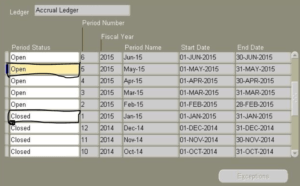
  • Navigate to the Control Payables Period Window
  • Select the Open Period that need to be closed
Oracle Payables Period Closure
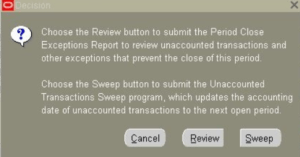
  • When updates the Period Status from Open to Closed, System will generate the message that Period cannot be closed due to Exception
  • Click on Exceptions button , Oracle Payables provides the below given options
Oracle Payables Sweep Program Options

Review (Submit the Subledger Period Close Exceptions Report for the Current Period that need to be Closed to view the listed exception)
Sweep ( Allows to change the Accounting Transaction Date to Open Period Date)


AP- Account Payables

Oracle Accounts Payables Automatic Offset Accounting

20 Jan 2021 oracleappsadmin

Oracle Accounts Payables R12 provides the feature of Automatic Offset Accounting in Oracle Payables which means that when automatic offset accounting is enabled and the invoice is submitted for approval, then Oracle Payables automatically allocates an Invoice’s Liability Account to the balancing segment on the Invoice Distribution Line based on default liability account defaulted from the Supplier Site.

Invoices submitted for approval cannot overwrite the accounts as Oracle Payables does not reflect the offset account for each invoice distribution.

Automatic Offset Accounting could be useful when an organization is using the same Operating Unit to make purchases with multiple balancing segments and thus in such cases creating different liability accounts for different distribution accounts becomes difficult.

Automatic Offset Accounting Methods

The Automatic Offset Accounting can be defined in 2 ways:

The Automatic Offset Accounting methods varies the Accounting entries for the defined Accounting Flexfield structure – Balancing Segment-Cost Center-Account

Accounts defined in Oracle Payables

Distribution Account
         balseg01.123.DistAcct01 DR 50
         balseg01.345.DistAcct02 DR 70
Liability Account
         balseg99.999.LiabAcct99 CR 120

Balancing as Automatic Offset Method: Performs the below actions

  • Payables takes the default liability account for the invoice
  • Substitutes the balancing segment from the invoice distribution
  • Use the balancing segment as distribution’s offsetting liability account
Accounting with Balancing Automatic Offset Method
        balseg01.999.LiabAcct99 DR 50
        balseg01.999.LiabAcct99 DR 70

Account as Automatic Offset Method: Performs the below actions

  • Payables takes the account used for the invoice distribution
  • Substitutes the account segment from the Invoice’s default liability account,
  • Retains the other segment values
Accounting with Account Automatic Offset Method
        balseg01.123.LiabAcct99     DR      50
        balseg01.345.LiabAcct99     DR      70

Automatic Offset Accounting Setup in Oracle Payables

  • Navigate to Setup -> Option- > Payable Option
  • In Accounting Option Tab , Select Automatic Offset Method as ‘Balancing’

Payable Invoice Creation using Automatic offset Accounting

Perform the below steps to create Invoice with Automatic Offset Accounting

  • Enter the Invoice Details
  • Click on Invoice Distribution button
  • Enter multiple balancing segment for Invoice Line
Type    Amount      GL Date             Account
Item    700         04-JAN-2021    01.200.7112.00
Item    1000        04-JAN-2021    02.200.7112.00
  • Save the Invoice
  • Validate the Invoice
  • Ensure Invoice Accounted and Journal Entry created
  • The Accounting entries have been subsituted with Liability Account . Consider your liability account is 2400 , then entry should change to

01.200.2400.00

02.200.2400.00


AP- Account Payables

Oracle Account Payable Invoice Reports

20 Jan 2021 oracleappsadmin

The blog provides the listing of Oracle Account Payable R12 Invoice Reports.  Each Organization need to close the pending payments for month end period closure to reconcile the Account payable module in Oracle Apps . The Account Payable Users are provided with Oracle Out of the box Payables Reports which helps them in identifying the Payable Prepayment Invoices , Mixed Invoices , Invoice Batches, Invoices on Hold, Supplier related information, Recurring Invoices processing , Credit Memos and Debit Memos for Payables which are pending for processing and requires accounting entries to be transferred to GL for Final Reconciliation Process.

Oracle Account Payable R12 Invoice ReportsDescription
Recurring Invoices ReportRecurring Invoices Report provides the configured Recurring Invoice Templates for the specified time period.
Recurring Invoices Report helps to determine the amount authorized , amount released and amount scheduled and remaining periods for recurring invoices defined in the recurring invoice template
Recurring Invoices Report lists recurring invoice templates by supplier and supplier site
Open Items Revaluation ReportOpen Items Revaluation Report provides the details on invoices, prepayments and credit memos and debit memos that are not fully paid
Matching Hold Detail ReportMatching Hold Detail Report provides detailed accounts payables and purchasing information for invoices with matching holds and matching hold releases for the specified time period. The report data could be useful if we need to validate payment batch to determine whether to manually release any invoices for payment
Invoice Validation ReportInvoice Validation Report provides the listing of matched and variance holds that payables applies and releases after submitting invoice validation
Credit Memo Matching ReportCredit Memo Matching Report provides the listing of credit memos and debit memos with total distribution line amounts and given currency. It also lists credit and debit memos raised for each supplier with amount
Invoice Audit Listing ReportInvoice Audit Listing Report provides the listing of duplicate invoices
Invoice Audit Listing by Voucher Number ReportInvoice Audit Listing by Voucher Number Report provides the listing of invoices with assigned sequential voucher numbers
Invoice Audit ReportInvoice Audit Report provides the listing of duplicate invoices with same invoice amount, invoice date, and supplier based on conditions
Invoice History ReportInvoice History Report provides the listing of specific invoice including all payments, gain/loss, credit , debit memos and discounts
Invoice on Hold ReportInvoice on Hold Report provides the listing of Invoice put on Hold . The Report provides Hold Invoices details like supplier , invoice number, purchase order, invoice amount and hold information. The Invoice on Hold Report also list down the predefined and user defined hold codes and provides the listing of invoices without exchange rates
Invoice Aging ReportInvoice Aging Report provides the listing of unpaid invoices which are due for invoice payments within four weeks periods
Invoice Register ReportInvoice Register Report provides the listing of invoices with offsetting liability accounts that payable creates for each invoice distribution on invoice approval
Posted Invoice Register ReportPosted Invoice Register Report provides the listing of invoices posted in particular period. The posted invoice register reports provides each accounts payable liability account and the invoice posted to the account along with the supplier and amount information for each invoice listed

AP- Account Payables unaccounted invoices report in oracle Payables R12

Create Prepayment Invoice in Oracle Account Payables

19 Jan 2021 oracleappsadmin

The blog provides the Oracle Account Payables Prepayment Invoice creation steps. Oracle EBS R12 Account Payables allows to create Prepayment Invoices to make the advance payments to Suppliers. The Prepayment Invoices can be created using below options

  • Invoice Workbench Window
  • Quick Invoice Window
  • iSupplier Portal

Accounting Entry – When Prepayment is created

Prepaid Expense A/c----------Dr
Liability A/c--------------------Cr

Accounting Entry – When Prepayment Invoice is paid

Liability A/c---------------------Dr
Bank/cash A/c-------------------Cr

Accounting Entry – When Invoice is raised for Expense

Expense Charge A/c--------------Dr
Liability A/c----------------------Cr

Accounting Entry – When Prepayment is applied to invoice then payables reverses the original prepaid invoice accounts

Liability A/c------------------------Dr
Prepaid Expense A/c--------------Cr

The below given steps are to be performed for creating Prepayment Invoice

  • Navigate to Invoices -> Entry -> Invoices
  • Enter Type as ‘Prepayment’
  • Enter Trading Partner , populates Supplier Number
  • Enter Supplier Site ( Supplier location)
  • Enter Invoice Date (System Date)
  • Enter Invoice Number
  • Enter Invoice Amount
  • Enter Description
  • Enter Prepayment Type as ‘Temporary’
  • Enter Settlement Date (System Date)
  • Payment Method as ‘Electronic’
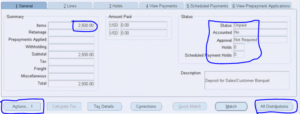
Prepayment Invoices in Payables
  • Enter Items Amount say ‘2500’
  • Invoice Status should be ‘Unpaid’ in the system
  • Accounted = ‘No’ in the system
  • Approval ‘Not Required’ in the system
  • Click on ‘All Distributions’ button shows the auto created distribution lines
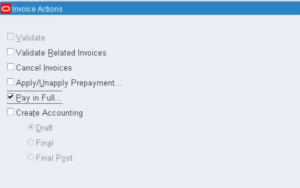
  • Click on ‘Actions…1’ and select Validated =’Checked’ . Click ok
Invoice Validation in Payables
  • Navigate to Payments Window
  • Select Type as ‘Quick
  • Enter Bank Account as <SUPPLIER_BANK_ACCOUNT>
  • Enter Payment Date (System Date)
  • Enter Document as ‘Electronic’
  • Remit to Account as <SUPPLIER_REMIT_TO_ACCOUNT>
  • Save Payments details
  • Invoice Number is generated
  • Navigate to Invoice Window
  • Search Invoice with Invoice Number and Invoice Type =’Prepayment’ and Supplier Number

Oracle Account Payables SQL to retrieve prepayment invoices

The below given SQL gets all the Invoices created with Invoice Type as ‘Prepayment’ in Oracle Account Payables R12

SELECT HR_OPERATING_UNITS_TBL.NAME
AP_INVOICES_ALL_TBL.INVOICE_NUM ,
AP_INVOICES_ALL_TBL.INVOICE_TYPE_LOOKUP_CODE,
AP_INVOICES_ALL_TBL.INVOICE_CURRENCY_CODE ,
AP_INVOICES_ALL_TBL.INVOICE_AMOUNT  ,
TO_CHAR(AP_INVOICES_ALL_TBL.INVOICE_DATE, 'RRRR/MM/DD')  ,
(SELECT VENDOR_NAME FROM AP_SUPPLIERS
		WHERE VENDOR_ID = AP_INVOICES_ALL_TBL.VENDOR_ID ) SUPPLIER_NAME ,
( SELECT SEGMENT1 FROM AP_SUPPLIERS
		WHERE VENDOR_ID = AP_INVOICES_ALL_TBL.VENDOR_ID ) SUPPLIER_NUMBER ,
( SELECT PARTY_SITE_NAME FROM AP_SUPPLIER_SITES_ALL ASSA ,HZ_PARTY_SITES HPS
		WHERE ASSA.PARTY_SITE_ID = HPS.PARTY_SITE_ID
		AND ASSA.VENDOR_SITE_ID = AP_INVOICES_ALL_TBL.VENDOR_SITE_ID) SUPPLIER_SITE,
AP_INVOICES_ALL_TBL.DESCRIPTION DESCRIPTION ,
AP_INV_LINES_ALL_TBL.LINE_NUMBER LINE_NO ,
AP_INV_DIST_ALL_TBL.LINE_TYPE_LOOKUP_CODE LINE_TYPE ,
GCC.CONCATENATED_SEGMENTS ,
SUM(AP_INV_DIST_ALL_TBL.AMOUNT) LINE_AMOUNT,
NVL(AP_INVOICES_UTILITY_PKG.GET_PREPAY_AMOUNT_REMAINING( AP_INVOICES_ALL_TBL.INVOICE_ID ),0) PREPAYMENT_AMOUNT_REMAINING 
FROM 	AP_INVOICES_ALL AP_INVOICES_ALL_TBL ,
		HR_OPERATING_UNITS HR_OPERATING_UNITS_TBL, 
		APPS.AP_INVOICE_DISTRIBUTIONS_ALL AP_INV_DIST_ALL_TBL,
		APPS.AP_INVOICE_LINES_ALL AP_INV_LINES_ALL_TBL, 
		APPS.GL_CODE_COMBINATIONS_KFV GCC
WHERE AP_INVOICES_ALL_TBL.INVOICE_TYPE_LOOKUP_CODE IN ( 'PREPAYMENT')

AP- Account Payables how to create prepayment invoice in oracle

Invoice Adjustments in Oracle Account Payables

19 Jan 2021 oracleappsadmin

The blog provides the steps for making Adjustment in Oracle Account Payables Invoices. The invoice adjustment in Oracle Account Payables is allowed for Invoice Details, Invoice Scheduled Payments and Invoice Distribution. Oracle Account Payables allows to make adjustments for the Paid Invoices also but that also requires corrections in the General Ledger Accounting entry and thus recommended to be performed with Approvals.

The invoice adjustments can be performed by the Authorized Payable Users only. The invoices adjusted are required to be Validated again except for adjustments related to Payment Term or Scheduled Payments for Validated Invoices

When Invoice and Invoice Batch Adjustment Not Allowed

The below points need to be considered when Invoices and Invoice Batch Adjustments cannot be performed

  • Adjustments cannot be performed on reversed invoice distribution as reversing encumbrance entry is created in Payables
  • Adjustments cannot be performed on Cancelled Invoices
  • Adjustments cannot be performed on Invoices that has Distribution being marked as ‘Final Matched’
  • Adjustments cannot be performed on Interest Invoices which are paid and accounted in system
  • Adjustments cannot be performed on Invoices selected for Payment in Payment Batch
  • Adjustments cannot be performed on Invoices with Invalid Account Details
  • Adjustments cannot be performed on Invoices having Withholding Tax
  • Adjustments cannot be performed on deleted distributions

Purchase Order Matched Invoice Adjustment

There could be a scenarios where the Invoice is matched to the Wrong Purchase Order( Purchase Order, Order Shipment, Receipts , Distribution) .

This can be corrected by “Reverse the matched distributions” OR “Create New Distribution for New Purchase Order”. In case of Reversing the Invoice Distributions, scheduled payment change is required to match the Invoice Amount Total.

Purchase Order Matched Invoice Adjustment can be done to GL Date, Income Tax Type, Accounting fields also.

Invoice Amount Adjustment

Perform the below steps for Payables Invoice Amount Adjustments

  • Search the Invoice Number in Invoice Workbench
  • Change the Invoice Amount
  • Navigate to Distribution Tab, Change Distribution to match the New Invoice Amount
  • Navigate to Scheduled Payment Tab, Change Schedule Payments to match the New Invoice Amount
  • Save the Invoice
  • Validate the Invoice

Invoice GL Date Adjustment

The GL Date is defaulted when the New Invoice Distribution is created. Payables uses GL Date as the Invoice Accounting Date . To make adjustments in the Invoice, Navigate to Distribution Tab, Change GL Date . The GL Date Adjustments can be done till the Invoice is Not Validated

Invoice Batch Adjustment

Invoice Batch Processing includes multiple Invoices to be processed together. The below adjustments can be done in Invoice Batch

  • Change the Invoice Batch Type Default. If the Payable User has mix of Invoices and Credit Memos , then after entering the invoices, the type default can be changes to Credit Memos to avoid entering individually
  • Modify the Control Count and Control Total to identify the Duplicate Invoices before creating Invoice Journal Entries
  • Adjustment can be done by adding New Invoices to Invoice Batch
  • Adjustment can be done by deleting invoices before Invoices are validated
  • Save the Invoice Batches

Invoice Schedule Payment Adjustment

The below given points to consider for Scheduled Payments

  • Payables Scheduled Payment Adjustments can be performed if the Invoice is Not Fully Paid
  • Payables Scheduled Payment Adjustments can be performed To Hold the Scheduled Payment
  • Payables Scheduled Payment Adjustments can be performed by changing unpaid scheduled payments

Perform the below steps for Payables Scheduled Payment Adjustments

  • Search the Invoice using Invoice Number
  • Navigate to Schedule Payment Tab, Change unpaid scheduled payments in the invoice
  • New Scheduled Payments can also be added to the Invoice as part of adjustment
  • Split Scheduled Payments can also be performed on the Unpaid Scheduled payments in the Invoice
  • Save the Invoice

AP- Account Payables

Oracle Account Payables Recurring Invoice Creation

19 Jan 2021 oracleappsadmin

The blog provides the Recurring Invoice Creation Steps in Oracle Account Payables module. Oracle EBS R12 Account Payables provides the functionality to manage the periodic expenses like monthly rent. Oracle Account Payables Recurring Invoice Creation Process requires the creation of Recurring Invoice Template which is to be used for creating recurring invoices. 

Points to Consider for Creating Recurring Invoices

Recurring Invoices Prerequisite Description
Define Calendar and Term Dates Define the Calendar for setting up the Frequency for recurring invoices like once a week or twice a month.
When Account Payables creates the recurring invoices, it creates the Invoice Date and Invoice Due Date which is created from Term Date Basis setting at Supplier Site.
If Term Date is System Date, then Invoice Date and Term Date is the date of when recurring invoice is created, else Term Date is is the first date of the period in which the recurring invoice is created
Purchase OrdersPurchase Orders can be used for Recurring Invoices but requires the below points to be considered
Match Option: The Recurring Invoices requires the Purchase Order Matching to avoid invoice creation conflicts. The Match Approval levels can be defined as 2-way, 3-way or 4-way matching
Purchase Order Attributes: The Recurring Invoices retrieves the Purchase Order(PO) attributes like Tax fields, Order Shipment and line amount when more than 1 distribution lines are mapped for single invoice line.
Quantity: If the Purchase Order (PO) order shipment or invoice item is quantity based, then Quantity is derived from Calculated Tax Amount Divided by Item Price
Blanket Purchase Orders: It is recommender to maintain Blanket Purchase Revision Number when Recurring Invoices are creating using templates
Distribution SetsDefine the Distribution Set for Default Accounts, distribution and line description if Purchase Order(PO) is not used with recurring invoices.
Payment AttributesPayment Attributes like Payment priority, payment method, remit to bank account, bank charge bearer , payment reason and comments , delivery channel used in recurring invoices can be defined on the Supplier Site or can be entered in the Recurring Invoice Template
Withholding Tax The Withholding Tax values are retrieved from Template if Withholding Tax Group is defined else retrieves from Supplier Site if defined at Invoice Validation or Payment
1099 ReportingThe Recurring Invoice retrieves Income Tax Type from Supplier Site when Supplier is defined as 1099 Reportable
Document SequencingRefer the Document Sequencing for recurring invoices from Document Sequencing profile option as automatic

Define Calendar for Payable Recurring Invoices

Perform the below steps for Defining Recurring Invoice Calendar

  • Navigate to Payables -> Setup -> Calendar -> Special Calendar
  • Select Calendar Type as Recurring Invoices
  • Enter the Calendar Name (Monthly) to be used
  • Enter the Calendar Description (Optional)
  • Enter Periods Per Year ( Enter 12 for Monthly Recurrence, Enter 2 for Half yearly Recurrence, Enter 24 for Half Monthly Recurrence)
  • Enter the Period Name ( JAN-2021 is for Monthly Period)
  • Enter the Fiscal Year (2021)
  • Period Sequence gets populated automatically for Recurring Invoice Sequence
  • Enter From Date and To Date are system generated
  • Due Date is system generated

Create Recurring Invoices Template in Account Payables

Perform the below steps for Creating Recurring Invoice in Account Payables

  • Navigate to AP-> Invoices -> Entry-> Recurring invoices
  • Enter the Supplier Name for Recurring Invoice
  • Enter the Supplier Number for Recurring Invoice
  • Enter the Supplier Site for which Recurring Invoice is created
  • Select the Recurring Calendar created above
  • Enter the Number of Periods ( defined in the Recurring calendar above)
  • Enter the First Period
  • Next Period is generated by system
  • Remaining Periods is generated by system
  • Navigate to Invoice Definition Tab in Recurring Invoice Screen
  • Enter Invoice Number
  • Enter Invoice Currency
  • Enter Invoice Description (Optional)
  • Select the Liability Account Code Combination for generating Recurring Invoice Accounting entries related to given liability account
  • Navigate to Line Definition Tab in Recurring Invoice Screen
  • Select the Option either Distribution Sets or Purchase Order(PO)
  • Enter Item Description (Optional)
  • Enter Manufacturer (Optional) Enter Model Number (Optional)
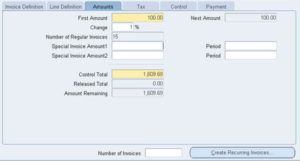
  • Navigate to Amount Tab in Recurring Invoice Screen
  • Enter the First Amount value
  • Enter the Change in Percentage(%) value: If 10% is given, then 10% of First Amount is added to get Total First Amount Value
Create Recurring Invoices in Payables R12

Click On Create Recurring Invoices button for generating Invoices in Invoices Workbench 


AP- Account Payables

Oracle Account Payables Invoice Overview

19 Jan 2021 oracleappsadmin

The blog provides the Invoice Overview in Oracle EBS R12 Account Payables module.  Any organization deals with Suppliers for the goods and services for their business. The Supplier in return creates an Invoice listing the amount to be paid for the given goods and services.  Oracle EBS R12 Account Payables module provides the functionality to manage the Supplier Invoice Processing. An Invoice is broadly divided into Invoice Header and Invoice Lines

Invoice Header:  The Invoice header provides the common information related to an invoice like Invoice Number, Invoice Date, Supplier Data and Payment Terms

Invoice Lines: The Invoice Lines provides the listing of each goods and services, Invoice Pricing , Invoice Tax & Freight Charges to be applied for each received entry in an invoice.

An invoice created has to be validated either manually or can be done automatically by matching the Invoice to the raised Purchase Order (PO) or Purchase Receipt. An invoice can be setup with the Invoice Line Approval Workflow by assigning the Invoice Approval Hierarchy.

For an Invoice, each invoice line could be mapped with single or multiple distribution lines. The distribution lines are considered for generating invoice accounting entry

For each invoice tax is calculated with the help of integrated Invoice Tax Setup. An invoice Tax Calculation uses the Invoice Header and Lines data for calculating the taxes that need to be applied to an invoice.

Different Ways for Entering Account Payables Invoice

An Invoice creation can be handled in different ways in Account Payables as given below

Invoice Creation ProcessDescription
Automatic Invoice Creation ProcessAccount Payables allows to create Recurring Invoices
Account Payables allows to create RTS Invoices. If Returns to Supplier feature is enabled in Oracle Purchasing then System creates Debit Memos to Suppliers
Account Payables allows to create Retroactive Price Adjustment Invoices. If Retroactive Pricing feature is enabled in Oracle Purchasing then System creates Adjustment and PO Price Adjustment Invoices
Import Invoice ProcessAccount Payables allows to Import Expense Reports through web browser using Oracle Internet Expense Reports feature
Account Payables allows to Import Credit Card Flat File for Credit Card Invoice processing
Account Payables allows to Import Electronic Invoices (EDI) through e-Commerce Gateway
Account Payables allows to Import XML Invoices through Oracle XML Gateway
Account Payables allows to Import Invoices from external system using SQL Loader
Account Payables allows to Import Lease Invoices transferred from Oracle Property Manager
Account Payables allows to Import Lease Payments transferred from Oracle Assets
Third Party Invoice Settlement ProcessAccount Payables provides the support for the created Invoices need to processed and settled in the system for every month end closure activity

Account Payables Invoice Types

The below given are the Invoice Types supported by Oracle Account Payables

Account Payables Invoice TypesAccount Payables Invoice Type Description
Standard InvoicesThese type of invoices are received from Suppliers against the goods and services delivered. The Standard Invoices amount should be positive and such invoices are either matched with Purchase Order(PO) or not
Mixed InvoicesThese type of invoices can be matched either to Purchase Order(PO) or matched with invoices. The Mixed Invoices amount could be positive or negative
PO Price Adjustment InvoicesThese type of invoices are created to record the amount difference between the Original Invoice and the New Purchase Order(PO) Price. These type of invoices can be matched either to Purchase Order(PO) or matched with invoices
Credit MemoThese type of invoices are created to record the Credit Amount against the goods and service provided by Supplier. The Credit Memos always have a negative amount
Debit MemoThe Memos are created to record the Credit Amount against the goods and service provided by Supplier in absence of Credit Memo not received from Supplier
PrePaymentThese type of invoices are created to record the Advance Payment made to Supplier or employee
Expense ReportsThese type of invoices are created to record the business related expenses related to an employee
Scheduled PaymentsThese type of invoices are created based on the Payment Terms defined in the Invoice header for scheduling payments
DistributionThese type of invoices include distribution details like account charges , invoice accounting details, GL Date , Project details etc..

AP- Account Payables

SQL Query to fetch Item Type error details in Oracle Workflow

10 Dec 2020 oracleappsadmin

The blog provides the Oracle SQL Query to fetch the Workflow Error details in Oracle Apps R12

SQL Query to fetch the Item Type error details in Oracle Workflow

 SELECT WF_ITEM_ACT_STATUS_TBL.ITEM_TYPE,
       WF_ITEM_ACT_STATUS_TBL.ITEM_KEY,
       WF_PROCESS_ACT_TBL.INSTANCE_LABEL,
       WF_PROCESS_ACT_TBL.PROCESS_NAME ACTIVITY,
       WF_ITEM_ACT_STATUS_TBL.ACTIVITY_RESULT_CODE,
       COUNT(*)
FROM   APPS.WF_ITEM_ACTIVITY_STATUSES WF_ITEM_ACT_STATUS_TBL,
       APPS.WF_PROCESS_ACTIVITIES WF_PROCESS_ACT_TBL
WHERE  1 = 1
       AND WF_ITEM_ACT_STATUS_TBL.ITEM_TYPE LIKE :ITEM_TYPE -- EG: REQAPPRV FOR REQUISITION APPROVAL
       AND WF_ITEM_ACT_STATUS_TBL.PROCESS_ACTIVITY = WF_PROCESS_ACT_TBL.INSTANCE_ID
       AND WF_ITEM_ACT_STATUS_TBL.ACTIVITY_STATUS = 'ERROR'
GROUP  BY WF_ITEM_ACT_STATUS_TBL.ITEM_TYPE,
          WF_ITEM_ACT_STATUS_TBL.ITEM_KEY,
          WF_PROCESS_ACT_TBL.INSTANCE_LABEL,
          WF_PROCESS_ACT_TBL.PROCESS_NAME,
          WF_ITEM_ACT_STATUS_TBL.ACTIVITY_RESULT_CODE
ORDER  BY WF_PROCESS_ACT_TBL.INSTANCE_LABEL;

SQL Query to fetch the Item Type error details in Oracle Workflow on a particular time period

SELECT 		WF_ITEM_ACT_STATUS_TBL.BEGIN_DATE, 
			WF_ITEM_ACT_STATUS_TBL.ITEM_KEY, 
			WF_Actvity_tbl.NAME ACTIVITY,
			WF_ITEM_ACT_STATUS_TBL.ACTIVITY_RESULT_CODE RESULT, 
			WF_ITEM_ACT_STATUS_TBL.ERROR_NAME ERROR_NAME,
			WF_ITEM_ACT_STATUS_TBL.ERROR_MESSAGE ERROR_MESSAGE
FROM 		WF_ITEM_ACTIVITY_STATUSES WF_ITEM_ACT_STATUS_TBL,
			WF_PROCESS_ACTIVITIES WF_Proc_Act_tbl,
			WF_ACTIVITIES WF_Actvity_tbl,
			WF_ACTIVITIES WF_Actvity_tbl_2,
			WF_ITEMS I
WHERE 		1=1
AND 		WF_ITEM_ACT_STATUS_TBL.ITEM_TYPE = 'REQAPPRV'
AND 		WF_ITEM_ACT_STATUS_TBL.ACTIVITY_STATUS = 'ERROR'
AND 		WF_ITEM_ACT_STATUS_TBL.PROCESS_ACTIVITY = WF_Proc_Act_tbl.INSTANCE_ID
AND 		WF_Proc_Act_tbl.ACTIVITY_NAME = AC.NAME
AND 		WF_Proc_Act_tbl.ACTIVITY_ITEM_TYPE = AC.ITEM_TYPE
AND 		WF_Proc_Act_tbl.PROCESS_NAME = WF_Actvity_tbl_2.NAME
AND 		WF_Proc_Act_tbl.PROCESS_ITEM_TYPE = WF_Actvity_tbl_2.ITEM_TYPE
AND 		WF_Proc_Act_tbl.PROCESS_VERSION = WF_Actvity_tbl_2.VERSION
AND 		I.ITEM_TYPE = 'REQAPPRV'
AND 		I.ITEM_KEY = WF_ITEM_ACT_STATUS_TBL.ITEM_KEY
AND 		I.BEGIN_DATE >= AC.BEGIN_DATE
AND 		I.BEGIN_DATE < NVL (AC.END_DATE, I.BEGIN_DATE + 1)
AND 		TRUNC(I.BEGIN_DATE) BETWEEN TO_DATE(:BEGIN_DATE) AND TRUNC(:END_DATE)
ORDER BY 	WF_ITEM_ACT_STATUS_TBL.BEGIN_DATE DESC


AP- Account Payables
  1. 1
  2. 2
  3. >>

Meta

  • Register
  • Log in

Archives

  • September 2021
  • August 2021
  • July 2021
  • June 2021
  • May 2021
  • January 2021
  • December 2020
  • November 2020
  • October 2020
  • September 2020
  • July 2020
  • June 2020
  • May 2020
  • April 2020
  • July 2019
  • June 2019
  • May 2019
  • May 2018
  • April 2018
  • November 2017
  • April 2017
  • July 2016
  • June 2016
  • May 2016
  • April 2016
  • March 2016
  • February 2016
  • June 2014
  • May 2014
  • March 2014
  • September 2013
  • May 2013
  • September 2012
  • June 2012

Archives

  • September 2021
  • August 2021
  • July 2021
  • June 2021
  • May 2021
  • January 2021
  • December 2020
  • November 2020
  • October 2020
  • September 2020
  • July 2020
  • June 2020
  • May 2020
  • April 2020
  • July 2019
  • June 2019
  • May 2019
  • May 2018
  • April 2018
  • November 2017
  • April 2017
  • July 2016
  • June 2016
  • May 2016
  • April 2016
  • March 2016
  • February 2016
  • June 2014
  • May 2014
  • March 2014
  • September 2013
  • May 2013
  • September 2012
  • June 2012

Archives

  • September 2021
  • August 2021
  • July 2021
  • June 2021
  • May 2021
  • January 2021
  • December 2020
  • November 2020
  • October 2020
  • September 2020
  • July 2020
  • June 2020
  • May 2020
  • April 2020
  • July 2019
  • June 2019
  • May 2019
  • May 2018
  • April 2018
  • November 2017
  • April 2017
  • July 2016
  • June 2016
  • May 2016
  • April 2016
  • March 2016
  • February 2016
  • June 2014
  • May 2014
  • March 2014
  • September 2013
  • May 2013
  • September 2012
  • June 2012

Powered by WordPress. Theme: Brawny by Webulous Themes

Recent Posts

  • How to create legal entity registration in Oracle Fusion
  • Query to get organization structure details in Oracle Fusion General Ledger
  • Assign Legal Entities and Balancing segments in Oracle Fusion
  • Create Legal Entity in Oracle Fusion
  • How to Create Implementation Project in Oracle Fusion
  • Purchase Requisition BPM Approval Workflow Tables in Oracle Fusion
  • Query to get Oracle Fusion Payables Cloud approver comments
  • How to create implementation user in Oracle Fusion
  • Functional Setup Manager in Oracle fusion
  • Top 50 AJAX Interview Questions and Answers